Private Docker Registry (CI/CD Setup)
Private Docker Registry — Usage Guide
Section titled “Private Docker Registry — Usage Guide”Registry URL:
https://docker.registry.hochguertel.workUI URL:https://docker-ui.registry.hochguertel.workAuth: Authentik API tokens (CLI) + Authentik SSO forward-auth (UI)
Architecture
Section titled “Architecture”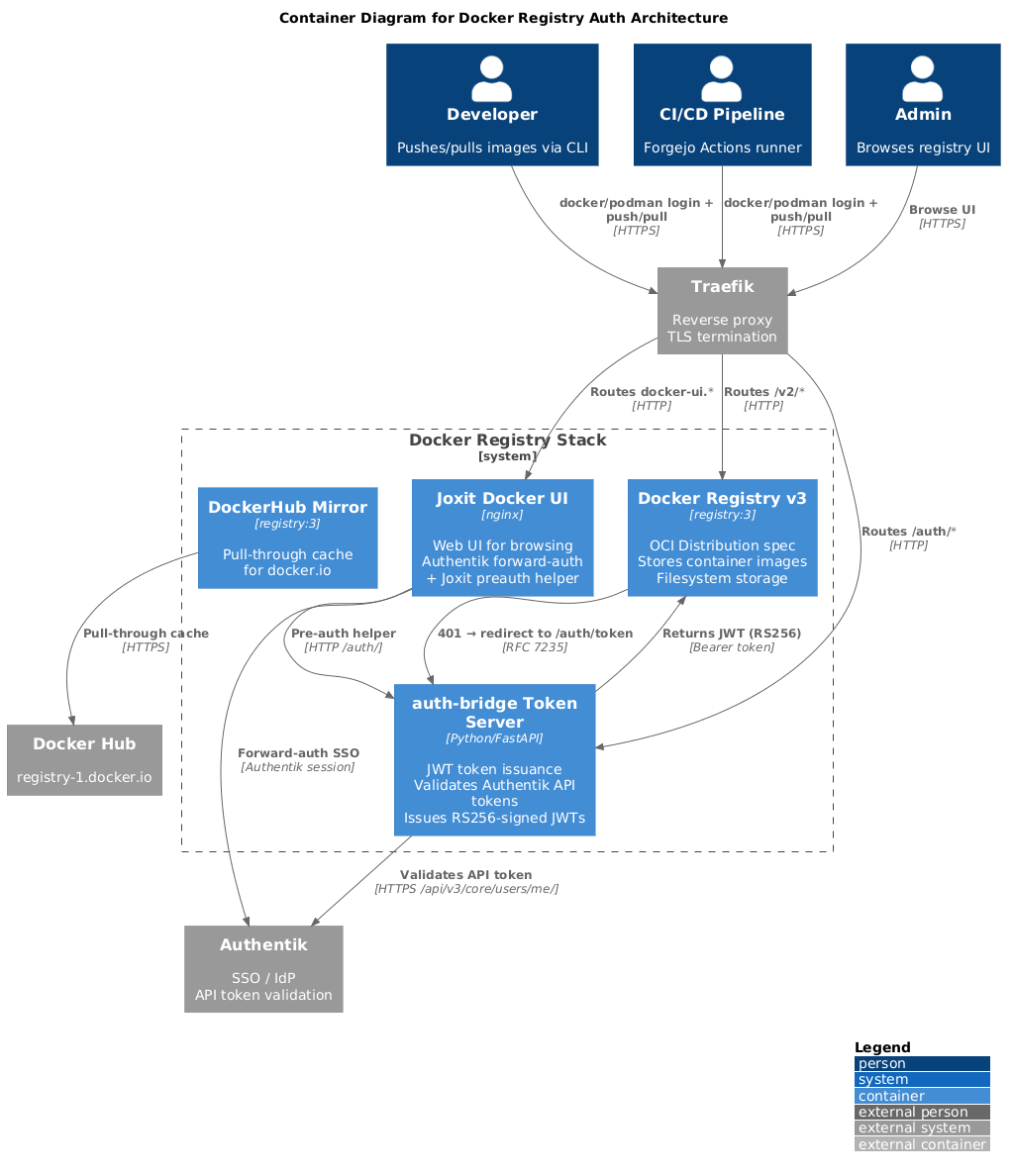
- CLI/CI login: Authentik API token as password —
auth-bridgevalidates against Authentik API, issues RS256-signed JWT (15 min expiry), Docker Registry accepts JWT as Bearer token - Browser UI: Authentik SSO forward-auth via Traefik + Joxit preauth helper for per-user bearer tokens
- Mirror: Pull-through cache for
docker.io(internal, no auth)
Authentication Flow (CLI)
Section titled “Authentication Flow (CLI)”podman push docker.registry.hochguertel.work/myimage:latest- Traefik routes
/v2/to Docker Registry - Registry returns
401withWWW-Authenticate: Bearer realm=... - CLI sends
GET /auth/tokenwithAuthorization: Basic base64(infra:<api-token>) auth-bridgevalidates the API token against Authentik/api/v3/core/users/me/- Token server issues RS256-signed JWT with ACL claims
- CLI retries push with
Authorization: Bearer <jwt> - Registry validates JWT, checks ACL, accepts push
ACL (Group-based)
Section titled “ACL (Group-based)”| Authentik Group | Pull | Push | Delete |
|---|---|---|---|
admins | Yes | Yes | Yes |
developers | Yes | Yes | No |
users | Yes | No | No |
The infra service account is in developers + users — can pull and push.
CLI Usage
Section titled “CLI Usage”Login with Podman
Section titled “Login with Podman”echo "<api-token>" | podman login docker.registry.hochguertel.work -u infra --password-stdinLogin with Docker
Section titled “Login with Docker”echo "<api-token>" | docker login docker.registry.hochguertel.work -u infra --password-stdinPush and pull
Section titled “Push and pull”podman tag myapp:latest docker.registry.hochguertel.work/myorg/myapp:latestpodman push docker.registry.hochguertel.work/myorg/myapp:latestpodman pull docker.registry.hochguertel.work/myorg/myapp:latestCI/CD (Forgejo Actions)
Section titled “CI/CD (Forgejo Actions)”- name: Login to private registry run: | echo "${{ secrets.DOCKER_REGISTRY_TOKEN }}" | \ podman login ${{ secrets.DOCKER_REGISTRY_URL }} -u infra --password-stdin
- name: Build and push run: | IMAGE="${{ secrets.DOCKER_REGISTRY_URL }}/my-org/myapp:${{ github.ref_name }}" podman build -t "${IMAGE}" . podman push "${IMAGE}"Key Differences from npm/PyPI
Section titled “Key Differences from npm/PyPI”| Aspect | Docker Registry | npm (Verdaccio) | PyPI (DevPI) |
|---|---|---|---|
| Auth | JWT (RS256) via auth-bridge | htpasswd (Basic) | htpasswd (Basic) |
| Token | Authentik API token | htpasswd password | Authentik API token |
| JWT expiry | 15 min (auto-renewed) | N/A | N/A |
| ACL | Group-based | Scope-based | Index-based |
| Push tool | podman push | npm publish | uv publish |
Full guide
Section titled “Full guide”The complete guide with troubleshooting, token management, operations, and
mirror configuration is in the registries repo:
/opt/services/registries/docs/docker-registry-guide.md