Private PyPI Registry (CI/CD Setup)
Private PyPI Registry (DevPI) — Usage Guide
Section titled “Private PyPI Registry (DevPI) — Usage Guide”Registry URL:
https://pypi.registry.hochguertel.workAuth: Authentik OIDC (browser) + Authentik API tokens (CLI) Container:registry-pypi
Architecture
Section titled “Architecture”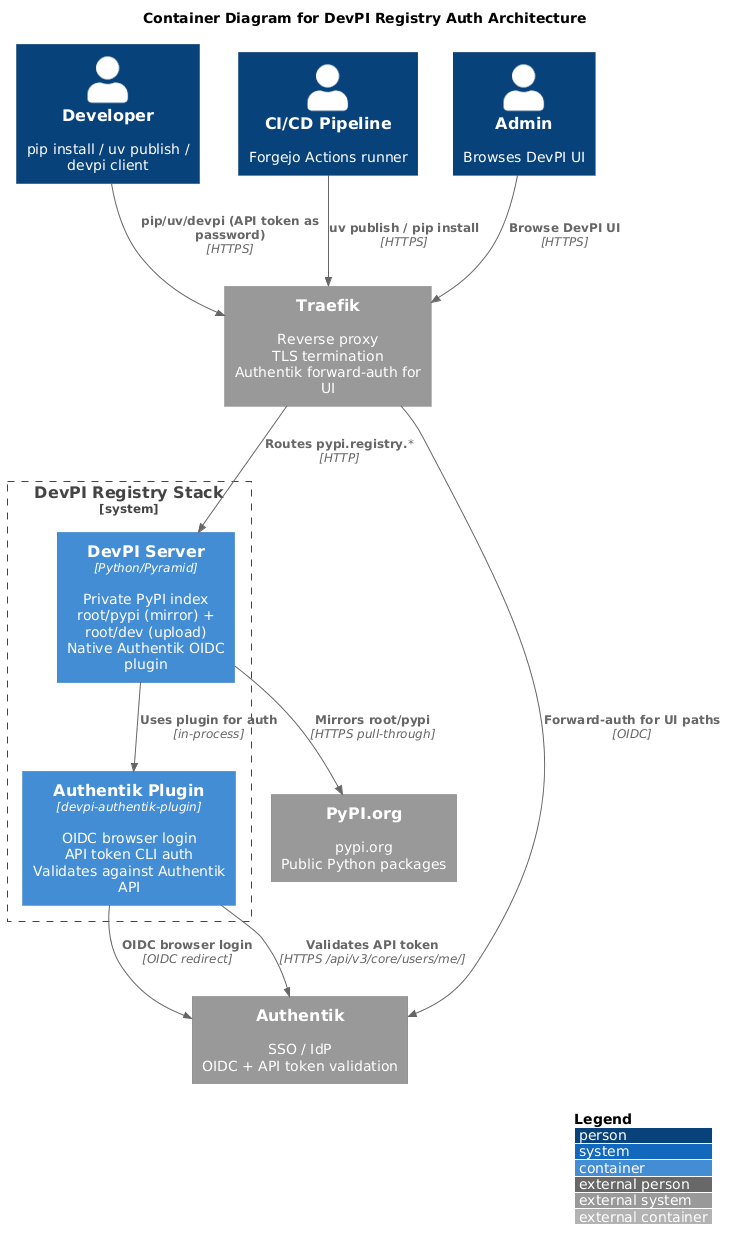
- Browser login: Authentik OIDC — native DevPI plugin redirects to Authentik
- CLI/CI login: Authentik API token as password — plugin validates against Authentik API
- Indexes:
root/pypi(public mirror) +root/dev(private uploads, bases:root/pypi)
Indexes
Section titled “Indexes”| Index | Purpose | Upload |
|---|---|---|
root/pypi | Public PyPI mirror | Read-only |
root/dev | Private packages | :developers, :admins |
CLI Usage
Section titled “CLI Usage”Installing packages
Section titled “Installing packages”# From private index (includes both private + public)pip install --index-url https://pypi.registry.hochguertel.work/root/dev/+simple/ <package>uv pip install --index-url https://pypi.registry.hochguertel.work/root/dev/+simple/ <package>Publishing packages
Section titled “Publishing packages”uv builduv publish \ --publish-url https://pypi.registry.hochguertel.work/root/dev/ \ --username infra \ --password <api-token>[hochguertel]repository = https://pypi.registry.hochguertel.work/root/dev/username = infrapassword = <api-token>twine upload --repository hochguertel dist/*CI/CD (Forgejo Actions)
Section titled “CI/CD (Forgejo Actions)”- name: Publish to DevPI run: | uv build uv publish \ --publish-url "${{ secrets.DEVPI_URL }}/" \ --username infra \ --password "${{ secrets.DEVPI_TOKEN }}"Key Differences from npm/Docker
Section titled “Key Differences from npm/Docker”| Aspect | DevPI (PyPI) | Verdaccio (npm) | Docker Registry |
|---|---|---|---|
| Auth | Authentik API token (Basic) | htpasswd (Basic) | JWT (RS256) via auth-bridge |
| UI auth | Authentik OIDC (native) | Authentik OIDC | Authentik SSO forward-auth |
| ACL | Group-based | Scope-based | Group-based |
| Push tool | uv publish / twine | npm publish | podman push |
Full guide
Section titled “Full guide”The complete guide with troubleshooting, token management, operations, and
twine/devpi client setup is in the registries repo:
/opt/services/registries/docs/pypi-registry-guide.md